Assembling
Installation via Scanning
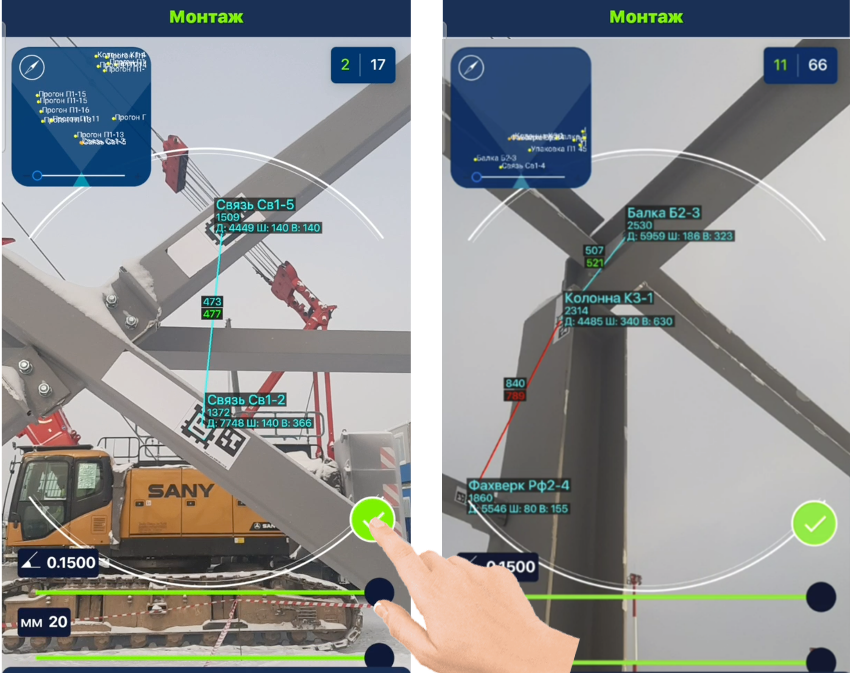
Work in “INSTALLATION” mode can be done in automatic and manual modes:
-
Automatic mode is used if the element was initially assigned a project position.
The installation correctness is determined automatically.
Point the camera at the node you want to check. The screen will show whether the parts are installed correctly, and the element’s status will update.
If the installation is incorrect, the screen will display the distance deviation from the project position (considering the accepted tolerance). -
Manual mode is used if markers are not in the project position.
In this case, the correctness is determined manually by the responsible employee. Tap the checkmark in Installation mode if the installation is correct.
Manual mode is also used if a marker on the construction site is physically damaged.
The status of items on the server will change to “Correctly Installed” or “Incorrectly Installed.”
Elements will be highlighted in green if installed correctly, or red if incorrectly installed.
Installation via 3D Model
CONTENT